An AI agent is only as useful as the information it has access to.
If you want an AI agent to answer questions about your business, products, services, pricing, policies, or other website information, it needs access to accurate and relevant business knowledge.
One practical way to provide this information is by training an AI agent using your website.
Instead of manually entering every product, service, FAQ, and company detail, a website AI agent can use your existing website content as its knowledge source.
The basic process is simple:
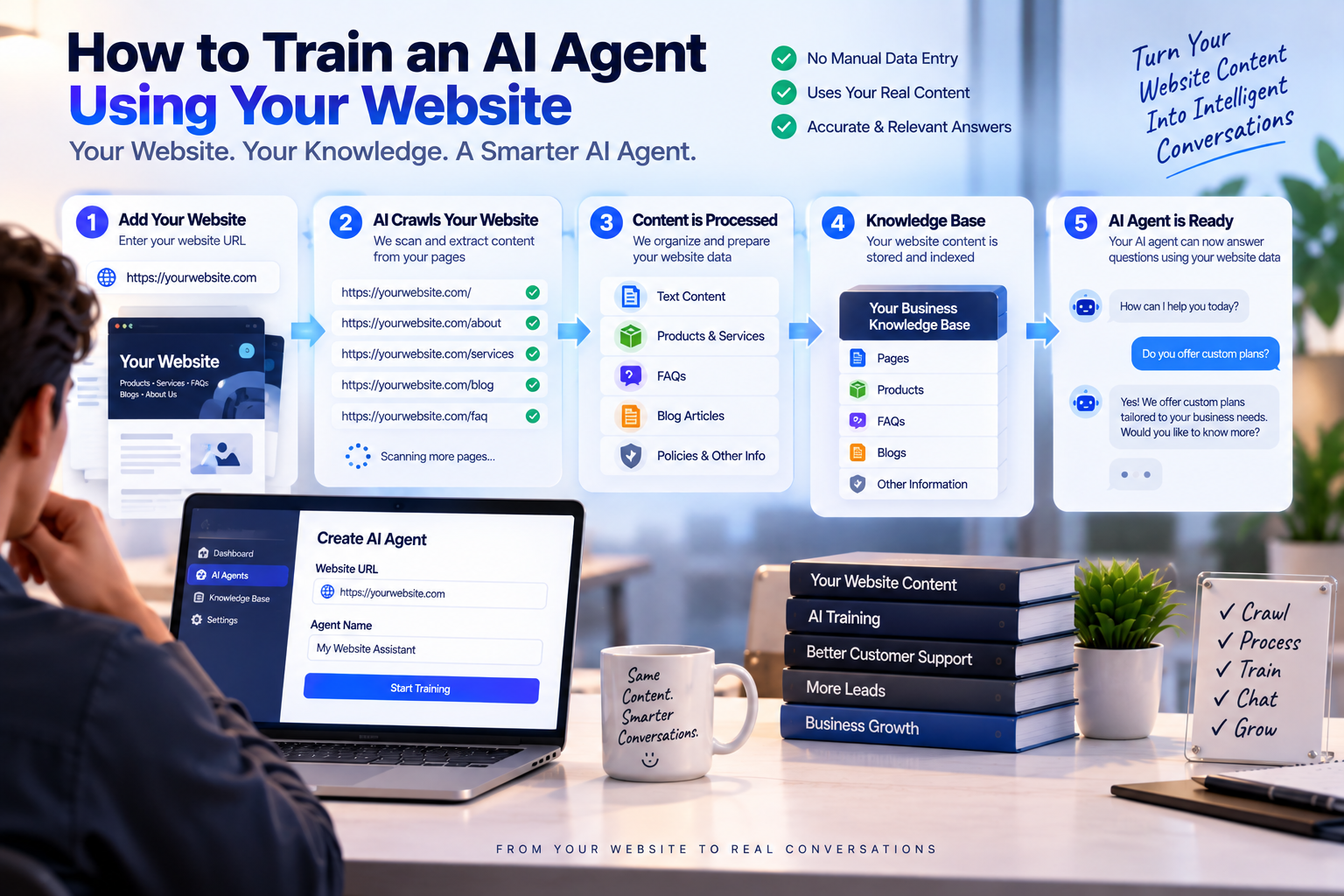
Website URL → Website Crawling → Content Processing → Knowledge Base → AI Agent → Customer Conversations
Let's understand how this process works.
What Does It Mean to Train an AI Agent With a Website?
When we say "train an AI agent using your website," it doesn't necessarily mean retraining the underlying AI model from scratch.
Instead, the AI agent is given access to relevant information collected from your website.
This can include:
- Website pages
- Product information
- Service details
- FAQs
- Pricing information
- Blog articles
- Company information
- Policies
- Other useful business content
The information is processed and organized so the AI agent can retrieve relevant content when a customer asks a question.
This allows the AI agent to answer questions based on your business information, rather than relying only on general AI knowledge.
Step 1: Add Your Website URL
The process starts with your website.
You provide the URL of the website you want the AI agent to understand.
For example:
https://yourwebsite.com
The system can then begin discovering relevant pages from the website.
Depending on the setup, this may include pages such as:
- Home
- About Us
- Services
- Products
- Pricing
- FAQ
- Contact
- Blog
- Policies
The goal is to collect useful information that customers may ask about later.
Step 2: Crawl the Website
Once the website URL is provided, a crawler can visit the relevant pages and extract their content.
The crawler reads the pages and identifies useful information such as text, headings, product descriptions, service information, and FAQs.
For a larger website, there may be hundreds or thousands of pages.
Automated website crawling makes it possible to collect this information without manually copying and pasting every page.
For example, the crawler may discover:
Homepage ↓ Services ↓ Pricing ↓ Products ↓ FAQ ↓ Blog ↓ Other Website Pages
The collected information then moves to the next stage: content processing.
Step 3: Process and Clean the Website Content
Raw website content isn't always ready to be used directly by an AI agent.
Web pages can contain navigation menus, buttons, advertisements, repeated text, HTML elements, and other information that isn't useful for answering customer questions.
The content therefore needs to be processed.
The system can organize useful information into cleaner knowledge that an AI agent can work with.
For example:
Website page:
"Premium Plan — $49/month. Includes unlimited projects, priority support, advanced analytics, and team collaboration."
can become structured knowledge that the AI can retrieve when a visitor asks:
"What is included in your premium plan?"
The better the content is processed, the easier it becomes for the AI agent to find relevant information.
Step 4: Build an AI Knowledge Base
After processing the website content, the information can be stored in a knowledge base.
Think of the knowledge base as the AI agent's business library.
It contains information collected from your website that the agent can use when answering customer questions.
A knowledge base might contain information about:
- Products
- Services
- Pricing
- Features
- FAQs
- Company information
- Policies
- Blog content
Instead of expecting the AI to remember everything, the system can search the knowledge base when a customer asks a question.
Step 5: Make the Content Searchable
A modern AI agent can use techniques such as semantic search and embeddings to find information that is relevant to a customer's question.
This is useful because customers don't always use the exact words found on your website.
For example, your website might say:
"Our premium package includes priority customer assistance."
A customer might ask:
"Do you provide faster support with the premium plan?"
The wording is different, but the meaning is similar.
Semantic search helps the system identify the relevant information from the knowledge base.
This allows the AI agent to provide more useful answers even when customers phrase their questions differently.
Step 6: Connect the Knowledge to the AI Agent
Once the knowledge base is ready, the AI agent can use it during customer conversations.
The process can look like this:
Customer Question
↓
AI Understands the Question
↓
Searches Relevant Business Knowledge
↓
Finds Relevant Information
↓
Generates an Answer
↓
Customer Gets a Response
For example:
Customer:
"Do you offer 24/7 support?"
AI Agent:
"Yes. Our AI customer support agent can assist website visitors 24/7. Human support is available during your team's working hours."
The answer is generated using relevant business information rather than simply producing a generic response.
Step 7: Test the AI Agent
Before launching an AI agent on a live website, testing is important.
You should ask questions that real customers are likely to ask.
For example:
- What products do you offer?
- How much does your service cost?
- What is included in this plan?
- Do you offer refunds?
- How long does delivery take?
- How can I contact your team?
- Which product is right for me?
Testing helps identify missing information and areas where the knowledge base may need improvement.
What Happens When Your Website Changes?
Websites aren't static.
Businesses regularly add new products, update pricing, publish articles, change policies, or modify services.
If the AI agent continues using old information, its answers may eventually become outdated.
This is why website-based AI systems need a way to keep their knowledge current.
When new content is added or important information changes, the knowledge base can be updated so the AI agent has access to the latest information.
Keeping AI knowledge synchronized with business information is an important part of maintaining a reliable AI customer support system.
Why Use Your Website as an AI Knowledge Source?
Your website already contains information about your business.
Instead of creating a completely separate information system from scratch, businesses can use their existing content as a starting point.
This provides several advantages.
Faster Setup
You don't have to manually enter every page of information.
Business-Specific Answers
The AI agent can answer questions using information relevant to your company.
Consistent Information
Customers can receive answers based on the same source of business information.
Easier Content Management
When your website contains well-organized information, it can become a useful knowledge source for your AI agent.
Scalable Support
Once the knowledge base is established, the AI agent can use it to handle many customer conversations.
Website AI Agent vs Generic AI Chatbot
There is an important difference between a generic AI chatbot and a website-trained AI agent.
A generic chatbot may be able to answer general questions about many topics.
But a website AI agent is designed to understand a specific business.
For example:
Generic AI:
"Tell me about customer support."
Website AI Agent:
"Our business provides AI-powered website support with 24/7 automated conversations and lead capture."
The second response is useful because it is based on the company's own information.
This makes website-based AI agents particularly useful for customer support, product discovery, lead generation, and business enquiries.
How Businesses Can Get Better Results
The quality of an AI agent depends heavily on the quality of the information it can access.
Businesses should therefore focus on maintaining clear and accurate website content.
Useful practices include:
- Keep product information updated
- Maintain accurate pricing
- Create clear FAQs
- Use descriptive service pages
- Keep policies current
- Remove outdated information
- Organize website content clearly
Better business information can lead to better AI conversations.
The Future of Website-Based AI Agents
As AI technology continues to improve, websites can become increasingly useful sources of knowledge for AI agents.
Instead of manually creating separate responses for every possible customer question, businesses can connect their existing information to an AI-powered support system.
The AI agent can then act as a conversational layer on top of the website.
Customers ask questions naturally.
The system finds relevant business information.
The AI generates a useful response.
And the conversation continues.
This creates a more interactive experience than traditional website navigation alone.
Final Thoughts
Training an AI agent using your website doesn't have to mean manually teaching the AI every single answer.
A modern website AI agent can crawl your website, collect relevant content, process that information, store it in a knowledge base, and use that knowledge to answer customer questions.
The overall process can be summarized as:
Add Website → Crawl Content → Process Information → Build Knowledge Base → Connect AI → Start Conversations
With accurate and up-to-date website information, an AI agent can become a powerful customer support and lead-generation assistant for your business.
Your website already contains the knowledge.
AI can turn that knowledge into conversations.